Bowlsy — clubs online, community for life
Join Bowlsy
HOME / EVENTS

Run the whole event, poster to podium.

Create the event once and Bowlsy makes the poster, lists it on the website, puts it on Club TV and hands you the share button. Then run the day itself — entries, rink draw, scores, a live ladder on the bar screen — and post the results everywhere the poster went.

Step 1 · Create the event ↓ Step 2 · Run the day ↓
Club TV — the live event ladder for the Kingfisher Classic in the Matchday look: club masthead, gold chips over cream standings cards, medal places, every pair's round-by-round margins and points LIVE ON CLUB TV
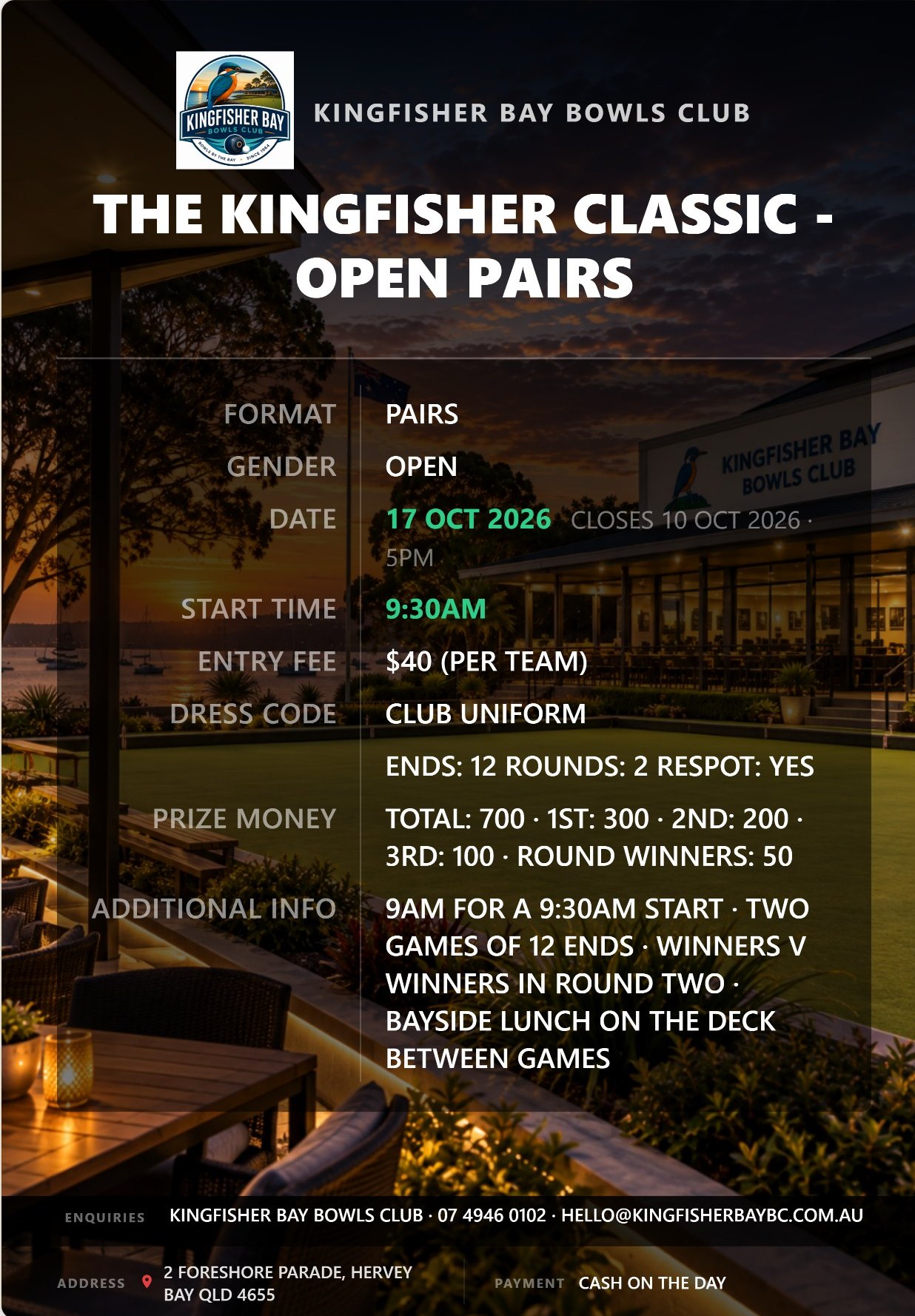
The event poster Bowlsy generated for the Kingfisher Classic — club badge, format, date, entry fee and contact over a sunset photo of the club's green
1 Create the event
1.1 Bowls or entertainment

Say what kind of day it is. The form does the rest.

A bowls event gets the full kit — format, gender, entry fee, prize money, dress code, entries-close date, sponsors, even how many ends and whether the jack is respotted. An entertainment listing is a trivia night, live music or a Sunday lunch: a quick card for What's On, no draws, no results.

  • Bowls, entertainment, darts, whatever else the club runs — each is its own category, with sub-categories like social bowls, tournaments and club championships.
  • Runs every Monday? Set it once as a recurring event and every week is ready to go.
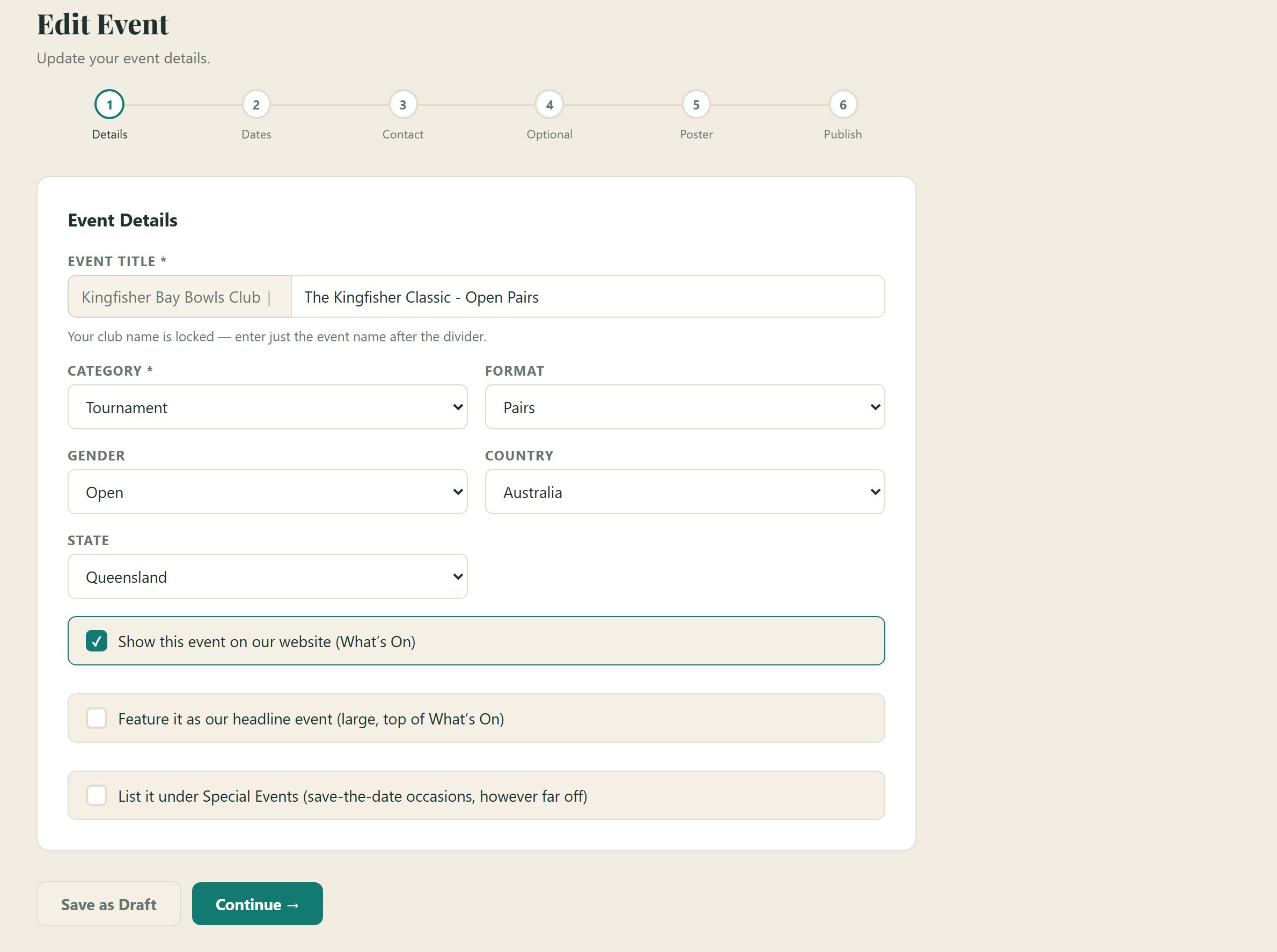
  • Tick a box to feature it at the top of What's On, or list it under Special Events for save-the-dates.
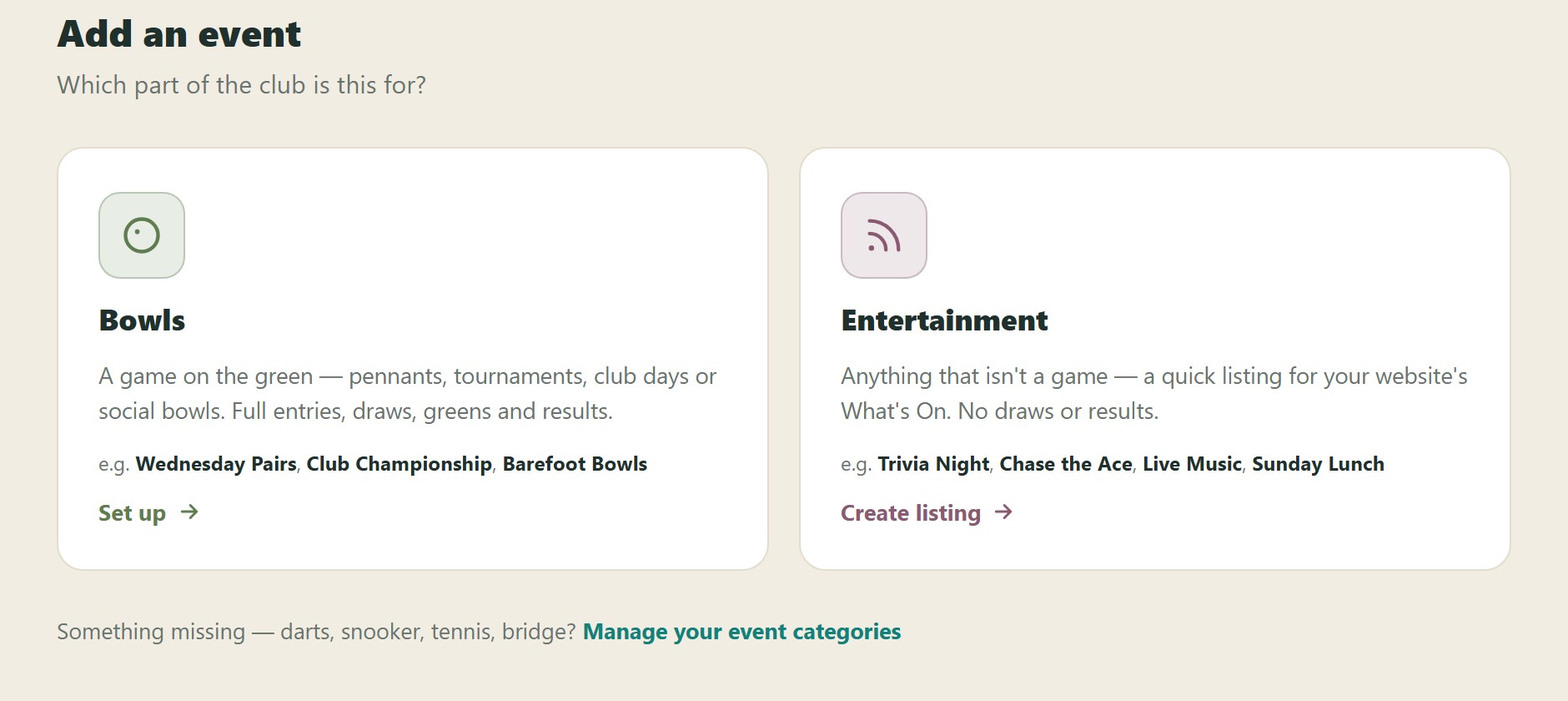
Add an event: choose which part of the club it is for — Bowls (pennants, tournaments, club days, social bowls) or Entertainment (trivia night, chase the ace, live music)
Step 1 of the event form — title, category, format, gender, and the website checkboxes: show on What's On, feature as headline, list under Special Events
The Poster step — pick a background from the club's photos, the finished poster renders live on the right with the event details laid over the club's own sunset photo; download buttons for Social Media (1080px) and Print Quality (2592px); an 'I have my own poster' switch at the top
1.2 The poster

The poster makes itself. Or bring your own.

Pick a background — a photo of your own green, or one of the shared ones — and the event details are laid over it as you type. No Canva, no committee member with "an eye for design". If someone has already made a poster, flick the switch and upload it instead.

  • Club badge, title, format, date, start time, entry fee, dress code and contacts, all placed for you.
  • Two downloads: a Social Media size for Facebook and Instagram, and a Print Quality one for the noticeboard.
  • Upload your club's own photos as poster backgrounds and every future event can use them.
1.3 Publish

Publish once. It's on the website, the TV and the socials.

Hit Publish and the event has its own page on the club website, a place in What's On, a slide on Club TV and a poster sized for the socials — and the next newsletter picks it up too. Nobody retypes anything.

Club website

Its own page, entry fee and all.

Date, venue, organiser contact and the poster, in your website's own colours and nav — a page you can link to from anywhere.
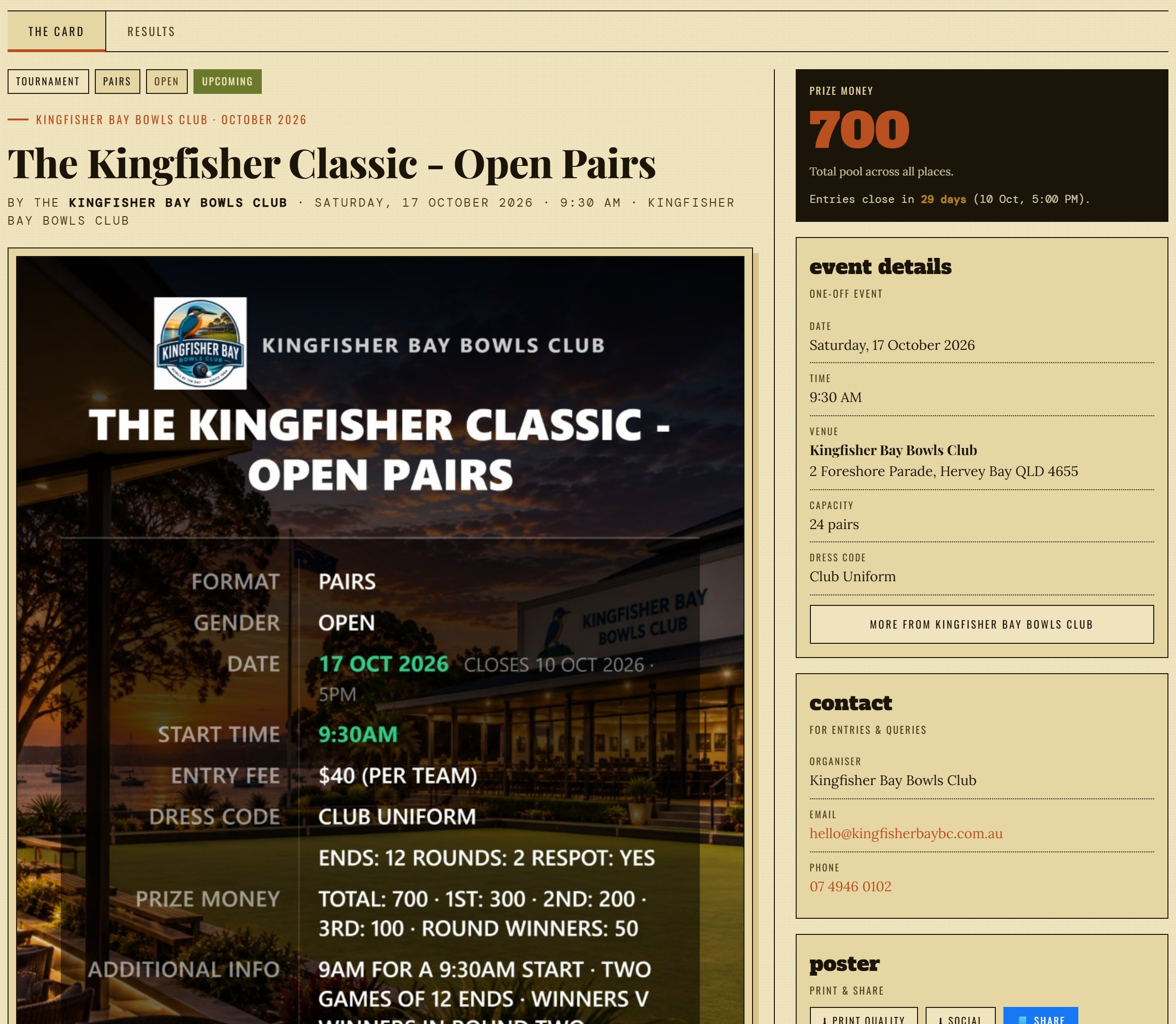
The Kingfisher Classic on the club's own website — the site's masthead and nav, the event details, a Get in touch panel, and the poster ready to tap full size
Club TV

On the bar screen before anyone asks.

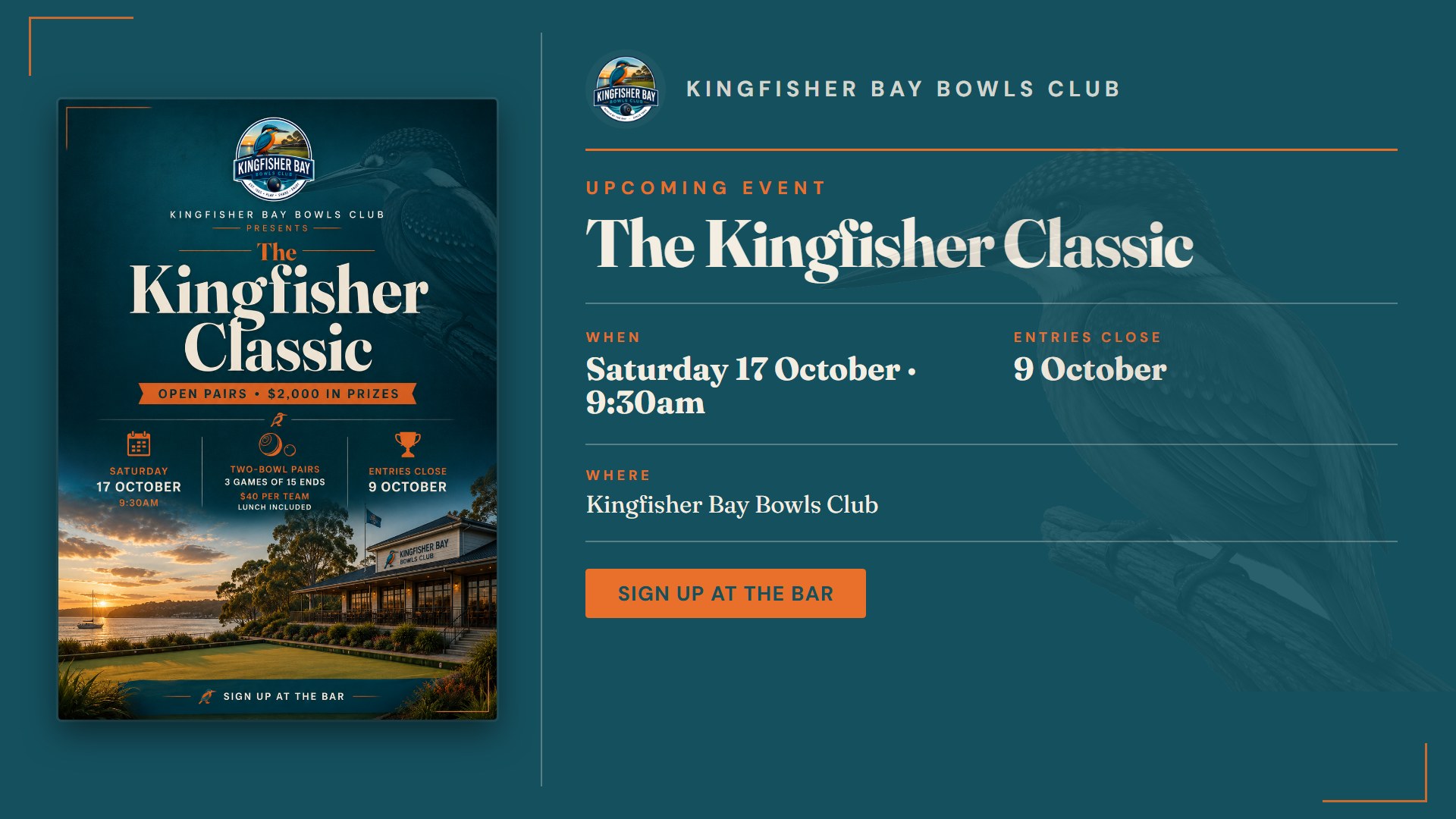
What's On lists the week's events automatically, and a published poster gets a full-screen slide of its own.
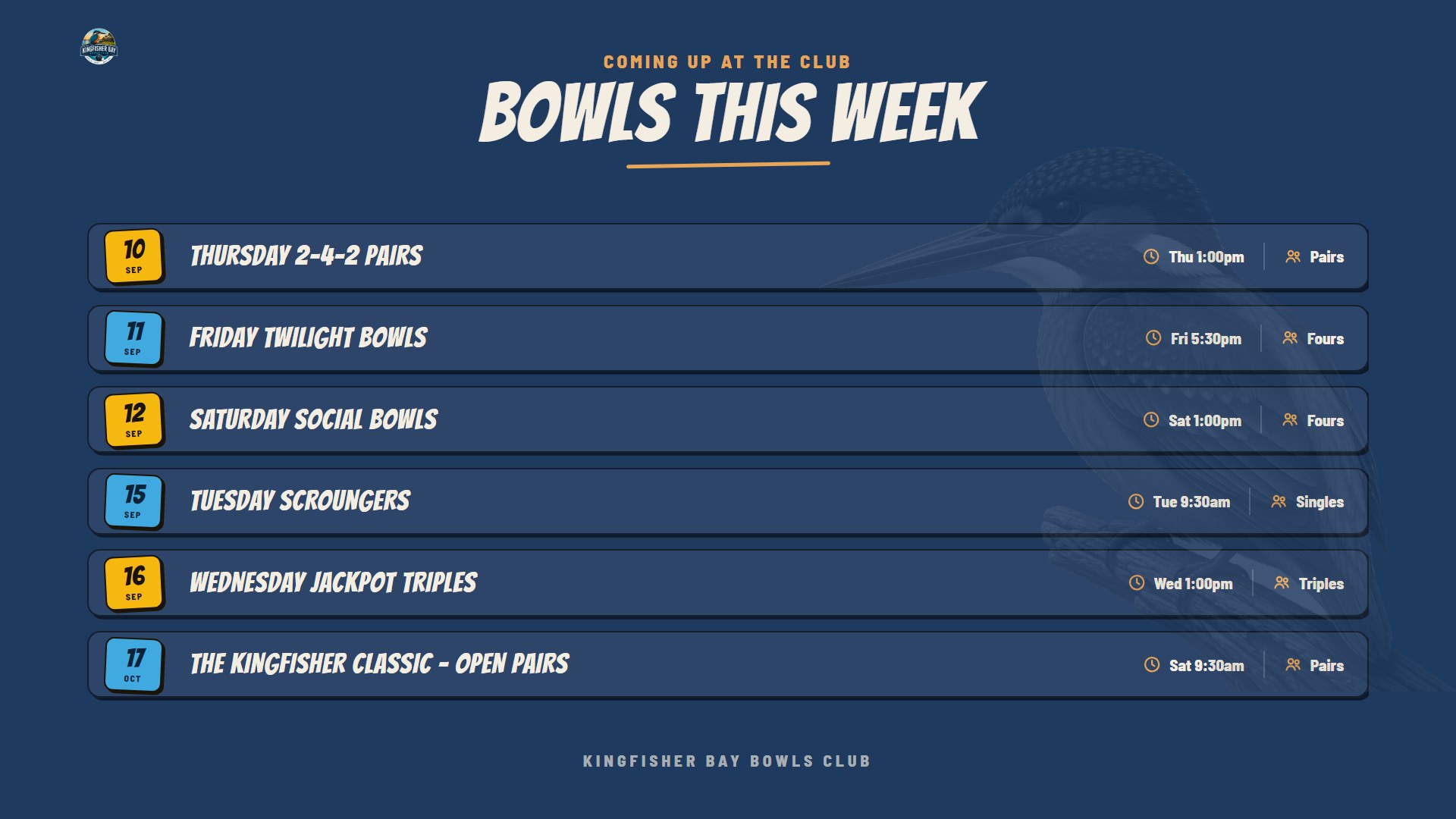
Club TV — the bowls week ahead board
Club TV — the Kingfisher Classic event poster board
Social media

One tap to share. One poster, already the right size.

Put the club's Facebook page in its profile and every event page gets a Share button that posts the event straight to it, poster as the preview. The Social download gives you a square-friendly 1080px poster for Instagram, the club group, or the WhatsApp chat.

Share on Facebook
↓ Social · 1080 px↓ Print · 2592 px
The generated event poster at social-media size
2 Run the day
2.1 Entries & format

Type the teams in. Pick how the day is played.

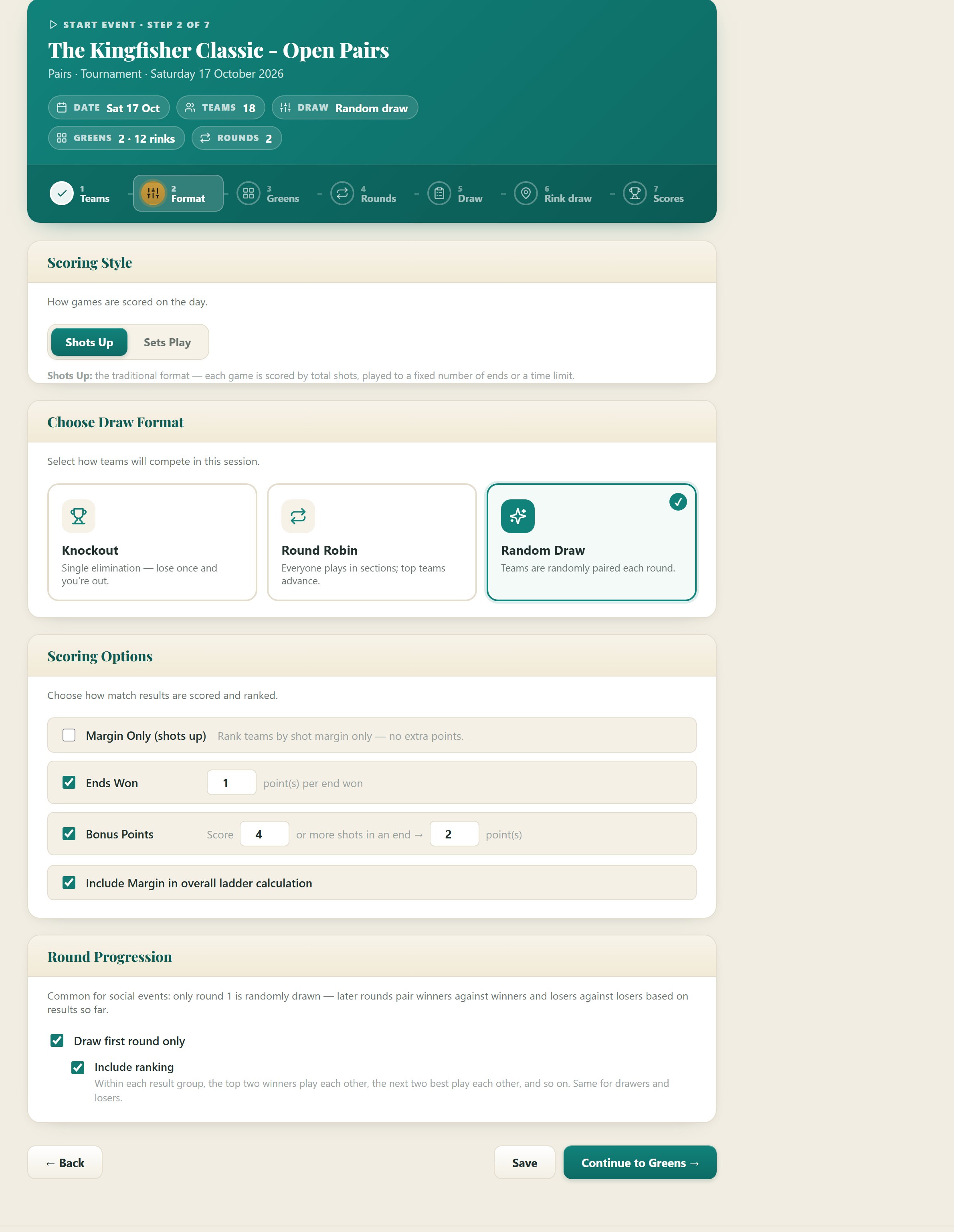
Lead and skip, or a full four — with club names if visitors are coming. Then choose the draw: knockout, round robin in sections, or a random draw where winners play winners. Shots up or sets play. Points for ends won, bonus points for a big end, margin in the ladder or not — however your club has always done it.

  • Knockout — single elimination, byes handled, winners flow into the next round automatically.
  • Round robin — everyone plays in sections; top teams go through to a knockout if you want one.
  • Random draw — draw round one only, then rank the field and pair winners with winners.
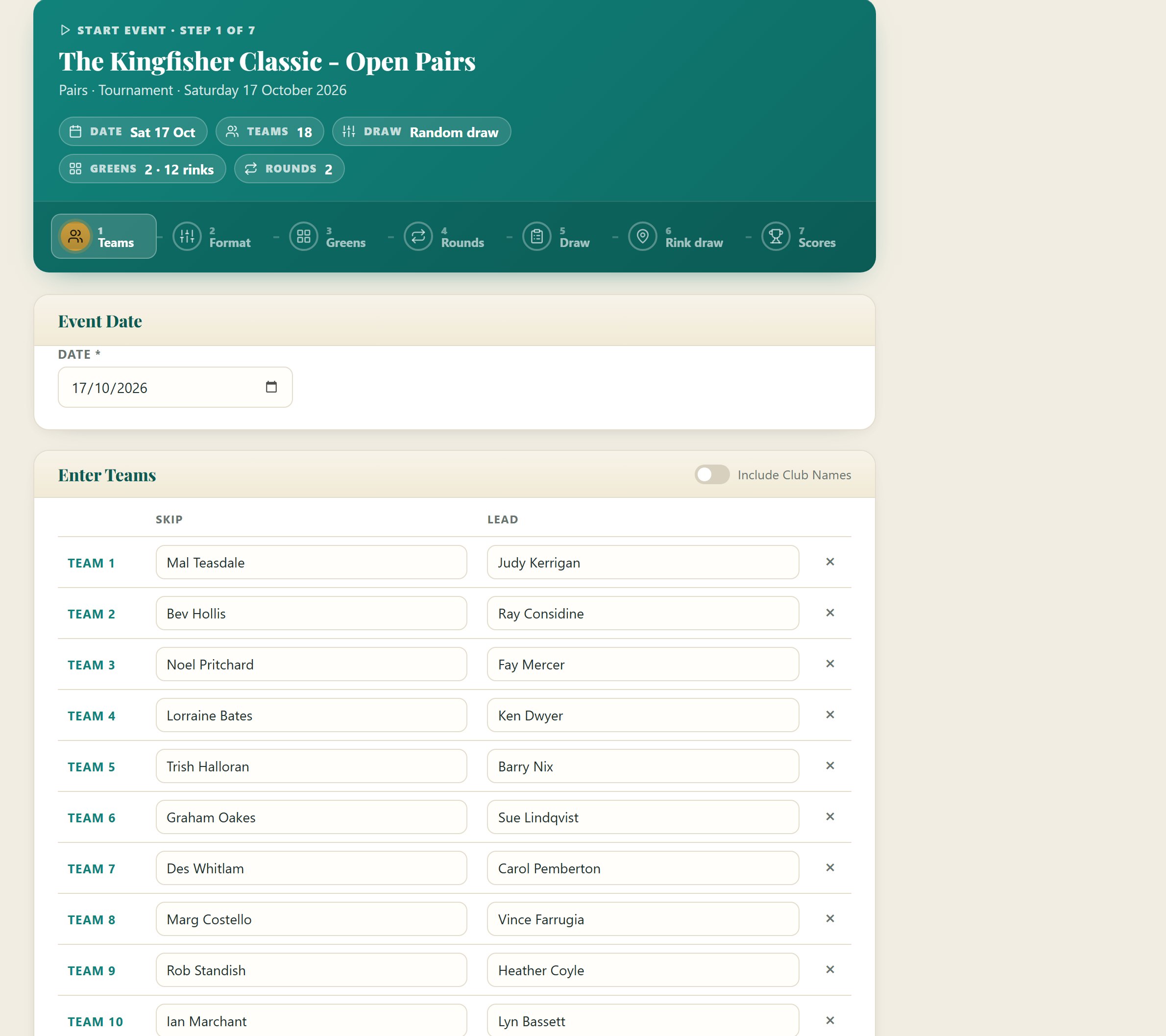
Start Event, step 1 Teams — event date and an Enter Teams table with Skip and Lead columns filled with eighteen pairs, and an Include Club Names switch
Step 2 Draw Format — Scoring Style (Shots Up or Sets Play), Choose Draw Format (Knockout, Round Robin, Random Draw), Scoring Options (ends won, bonus points, margin) and Round Progression (draw first round only, include ranking)
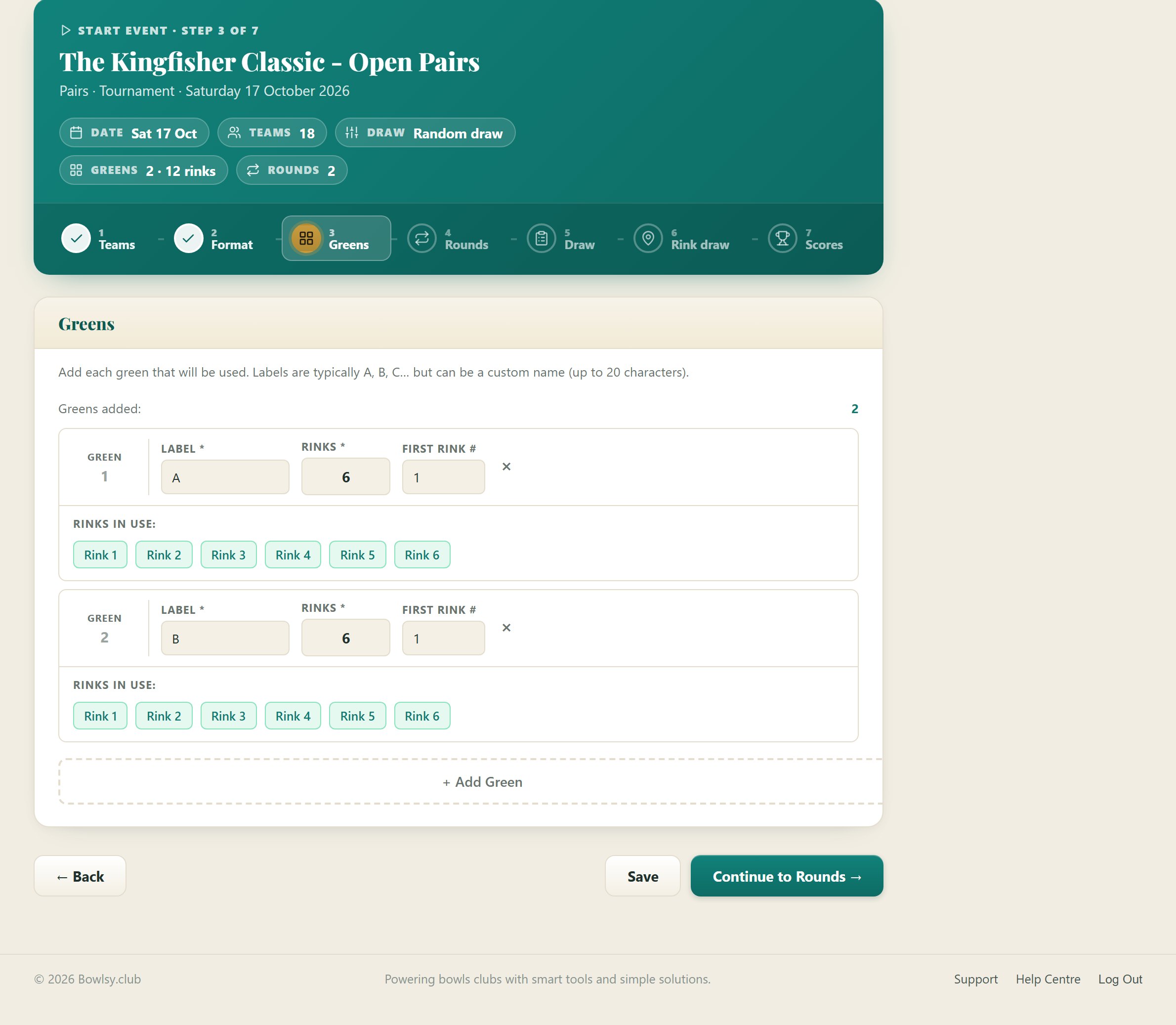
Step 3 Greens — each green with a label, number of rinks and first rink number, and the rinks in use shown as chips
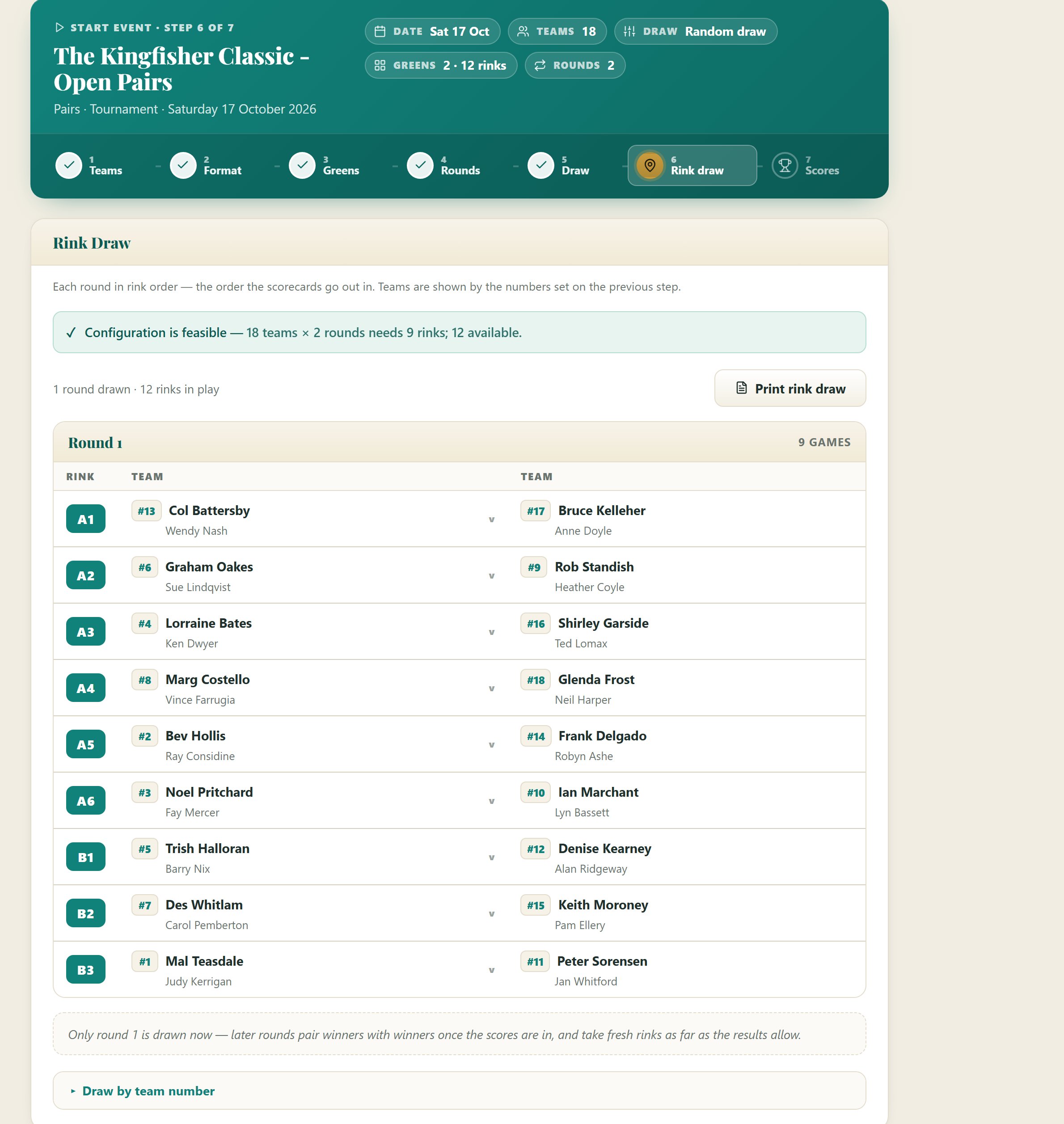
Step 6 Rink draw — 'Configuration is feasible: 18 teams × 2 rounds needs 9 rinks; 12 available', then round one listed rink by rink, A1 to B3, each pair against its opponent
2.2 Greens & the draw

Tell it your greens. It does the rink draw.

Add each green and its rinks, say how many rounds, and Bowlsy checks the numbers add up before anyone walks onto the grass. Team numbers can be drawn from the hat on arrival and typed in, or handed out at random. Then every team gets an opponent and a rink, spread across the greens.

  • Feasibility check up front: eighteen teams over two rounds needs nine rinks — you have twelve. Good to go.
  • The draw comes out in rink order, A1, A2, A3, so the scorecards go out the way the greens are walked.
  • Run a two-game afternoon the traditional way with two rink cards: round two's rinks are drawn up front, win and you go to one rink, lose and you go to the other, so every card is written before the first bowl.
  • Later rounds pair winners with winners and avoid rematches. Singles knockouts can allocate markers from the players sitting out.
2.3 Scores

Score entry anyone can do.

One card per rink. Type the shots, the ends won and any bonus, tap Final, and the ladder moves. Made a mistake? Undo and re-enter. When the round's in, generate the next one from the standings — no pencil, no eraser, no arguments about the arithmetic.

  • Works from a phone or a laptop — whichever is closer to the green.
  • Sets play handles two sets and a tiebreak and works the winner out itself.
  • Every card shows the margin and the points it earned, so the skip can check it on the spot.
Round 1 score cards — one card per rink with each team's ends won, bonus and score, the winner marked W, a Final badge and an undo control
2.4 Live on Club TV

The ladder, live on the clubhouse TV. This is the bit people talk about.

Press Show on TV and the event goes onto the screen above the bar. Every score entered at the desk is on the wall a moment later — who's leading, who's in the hunt, who needs a big last round. Players stop crowding the scorer and start watching the screen.

  • A board for each format: the live ladder for random draws, the bracket for knockouts, every section's mini-ladder for round robins.
  • Rotates with the sponsor slides and the rest of the playlist, so the sponsors get seen on the busiest day of the month.
  • Tidies itself away the day after the event. Nothing to take down.
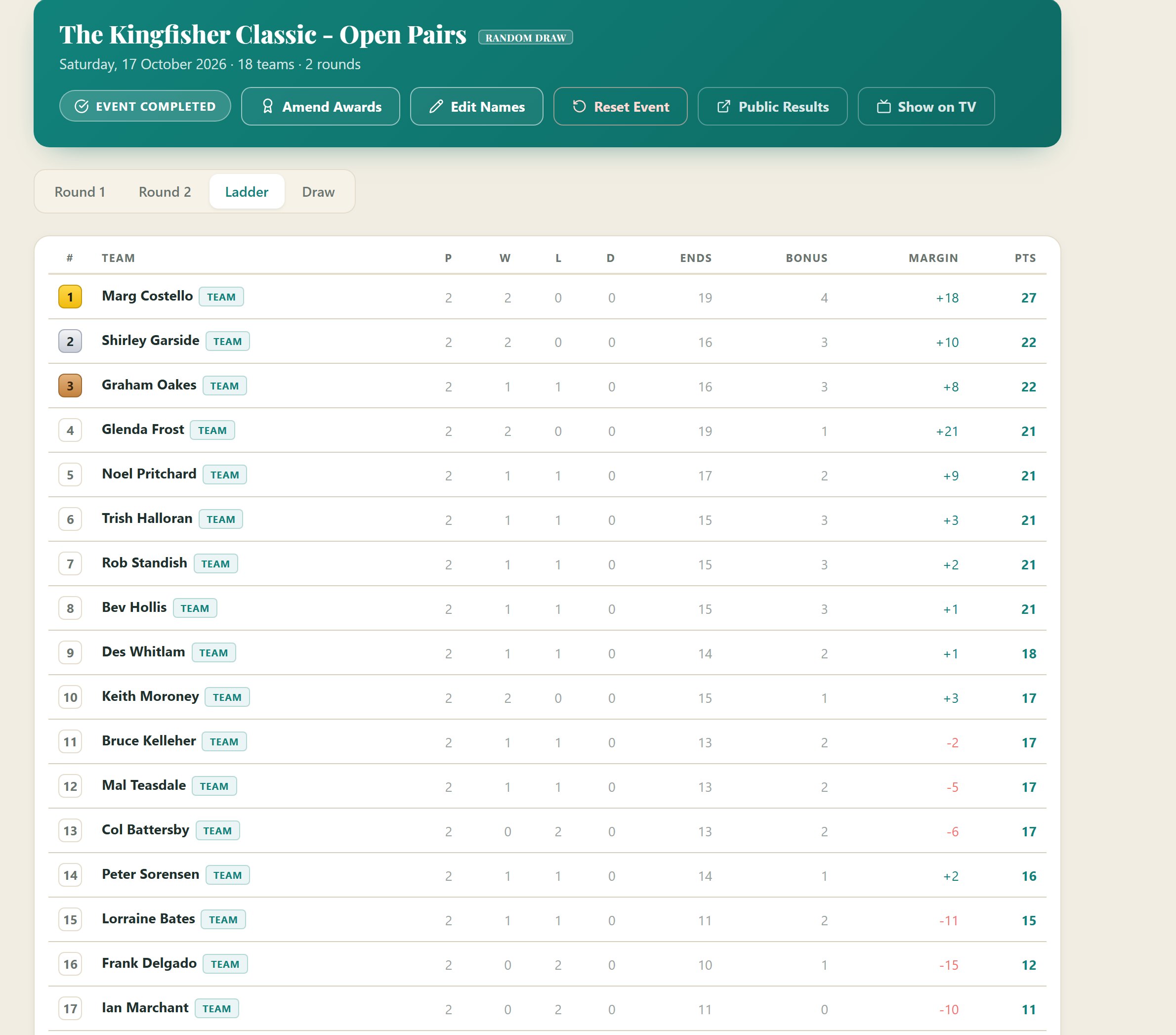
Club TV — the Kingfisher Classic final standings in the Matchday look: places 1 to 9 and 10 to 18 on two cream cards, gold, silver and bronze badges on the podium, each round's margin and opponent, ends, bonus, margin and points
The final ladder — played, won, lost, drawn, ends, bonus, margin and points for all eighteen teams, gold, silver and bronze markers on the top three
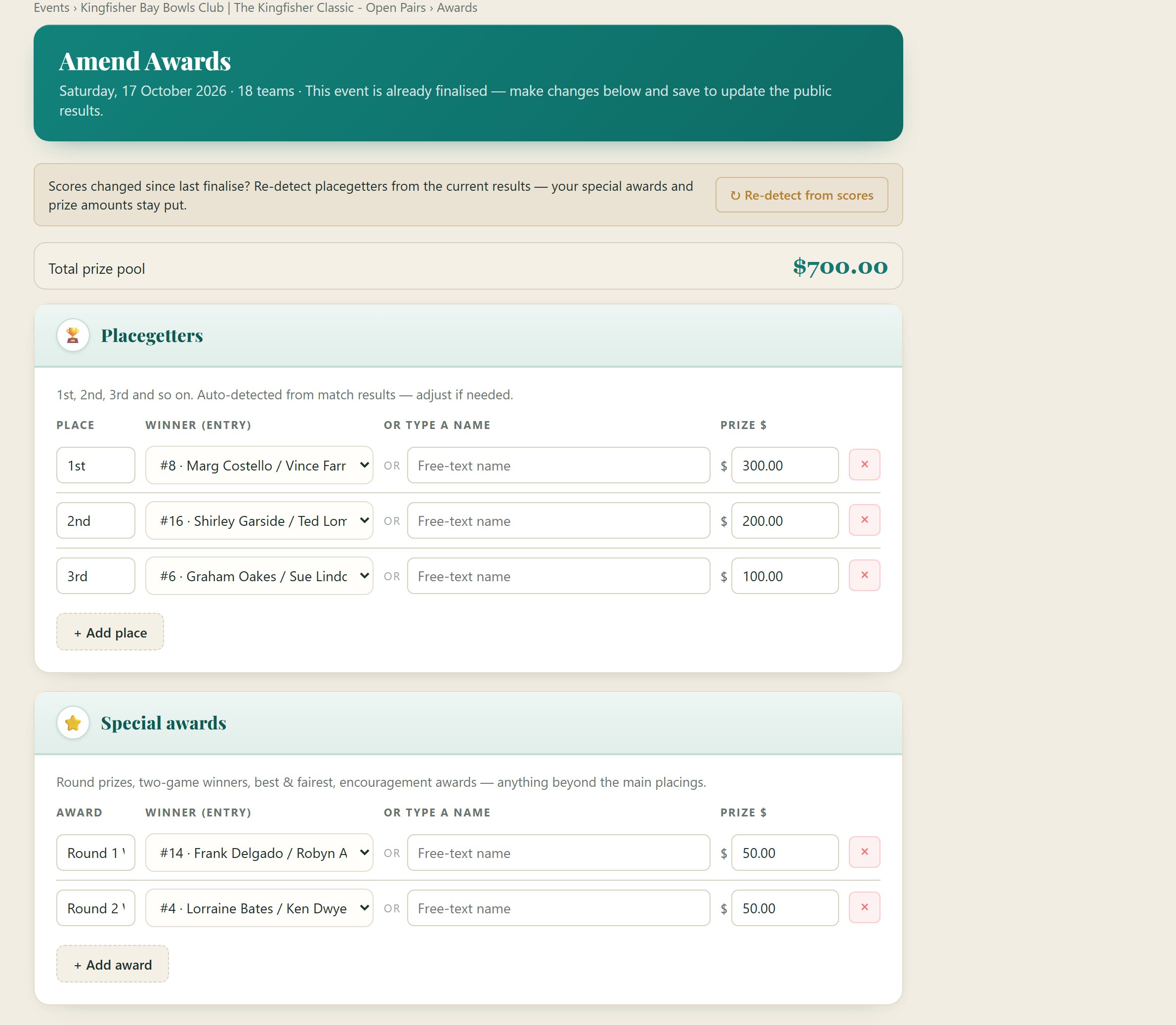
Amend Awards — total prize pool $700, Placegetters auto-detected from the results with prize amounts, and Special awards for round winners
2.5 The finish

Final table, placegetters, prize money.

The last card goes in and the podium is already worked out. Put the prize money against each place, add the round winners and the best-and-fairest, and finalise. The prize pool totals itself, so the treasurer's envelope matches the announcement.

  • Placegetters are detected from the results — override them if the club has a rule the computer doesn't know.
  • Special awards for anything beyond the placings: round prizes, two-game winners, encouragement awards.
  • Scores changed after finalising? Re-detect from the new results without losing the prize amounts.
2.6 Results

Results posted everywhere the poster went.

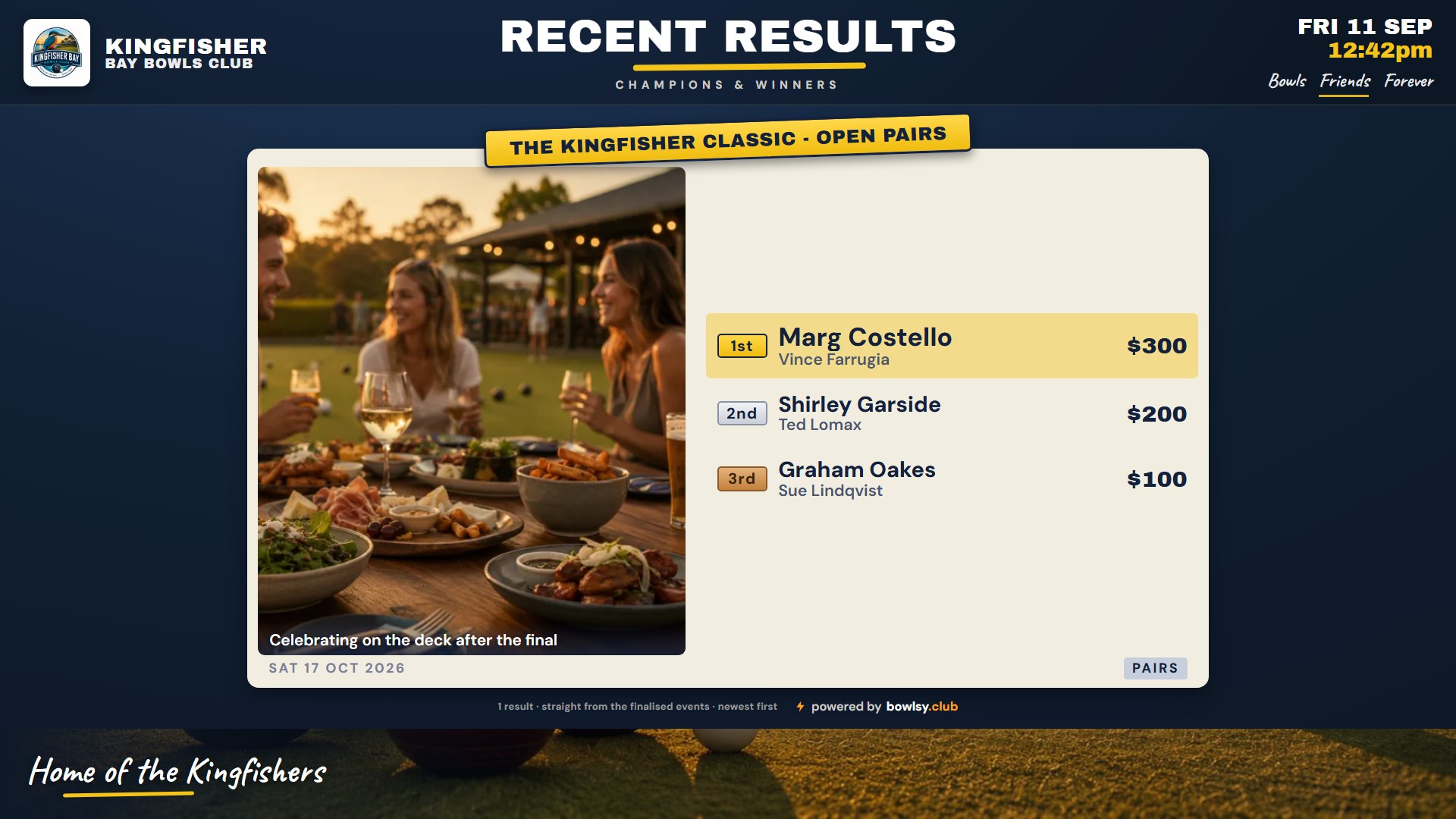
Finalise and the winners go straight onto the club website's results board — podium and special awards, in the site's own colours — and Club TV's Recent Results board picks them up for the week, photo and prize money included. Nothing to retype.

  • Bowlsy drafts a news article with the podium and round-by-round scores — publish it as is or add a paragraph.
  • Recurring events build a results history, week by week, with a filter per event.
  • Keep a session off the public results if it was only a practice day. What goes public is yours to choose.
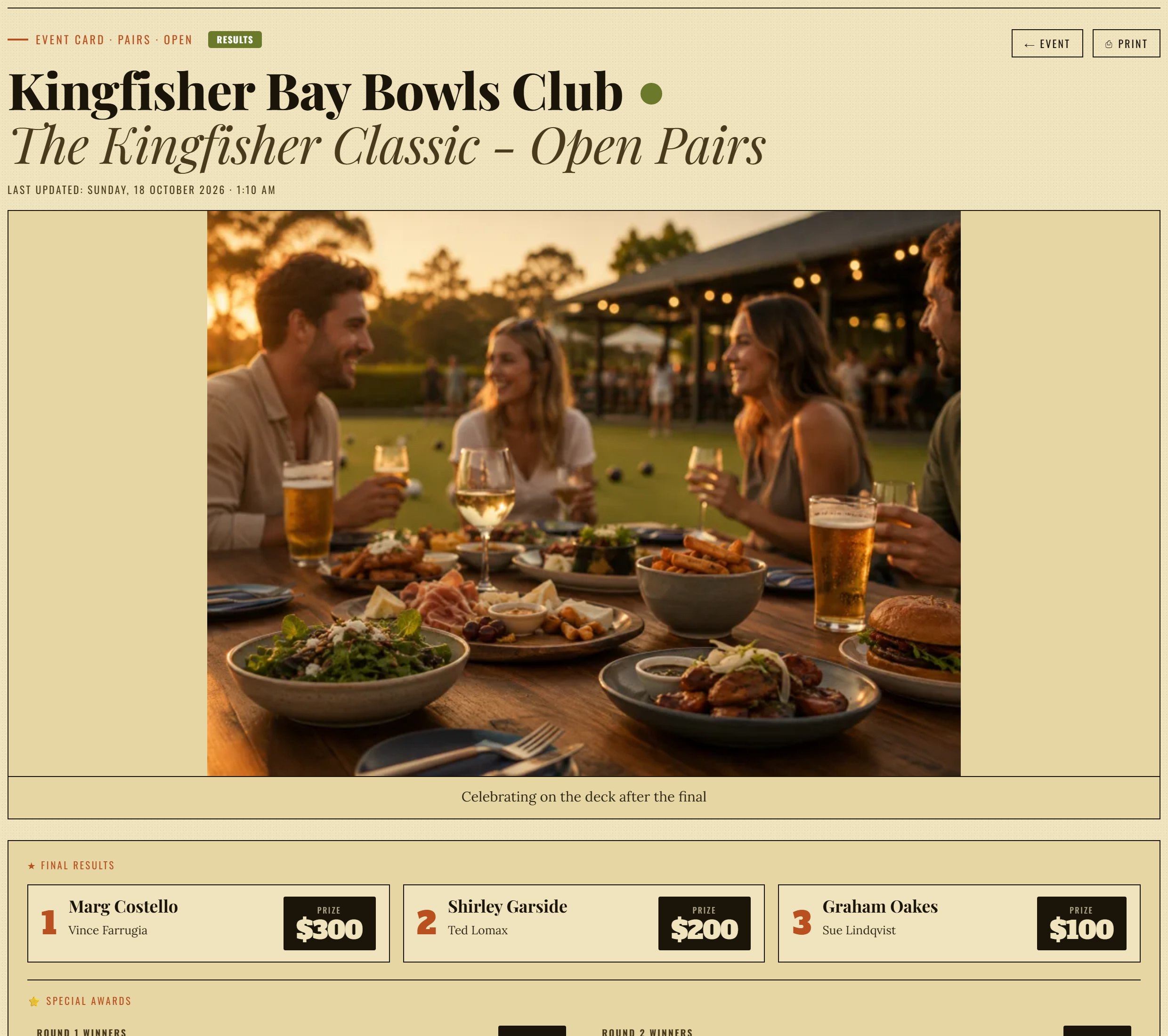
The Event Results section on the club website — the Kingfisher Classic card with Winners, Runners-up, Third and the round winners, in the site's own colours
Club TV — Recent Results board: the Kingfisher Classic winners and runners-up with the trophy icon

Ready to run your next event on Bowlsy?

  • ✓ Poster, website, Club TV and socials from one form
  • ✓ Knockout, round robin and random draws, rinks allocated for you
  • ✓ Live ladder on the clubhouse TV, results everywhere after
Book your free walkthrough →